Introduction
If you need to send the Mic Live signal from an AEQ desk to Smartsign, then you will first need to get the signal from the desk into the Broadcast Radio Hardware Service. Once there, you can use the Patchbay in the Hardware service to bounce the the GPI from the AEQ device to the Smartsign device, then you can use this with a Smart Tile in SmartSign to display the status of the Mic Live.
Requirements
You will need to have a PC with the Broadcast Radio Hardware Service and AEQ Setup software installed to be able to make the required changes, but these do not need to be the same PC.
Configuring the Hardware Service
On the PC that is running the Hardware Service you will need to add a AEQ Receive device to the Hardware Service in the Hardware Service Configuration tool. The Windows Firewall will also need to allow incoming connections to the HW Service so the AEQ can send the trigger in.
Configuring the AEQ Desk
Once you have the PC side done you will need to make a few changes to the mixing desk using the AEQ Capitol/Forum Setup software so that it knows how to send the signal to the HW Service. WARNING: It is vital that you take a backup of the current mixer configuration before making any changes to your AEQ. Please see the AEQ manual for you mixer for guidance on how to do this, or contact support before attempting to make any changes if you are at all unsure of how to do this.
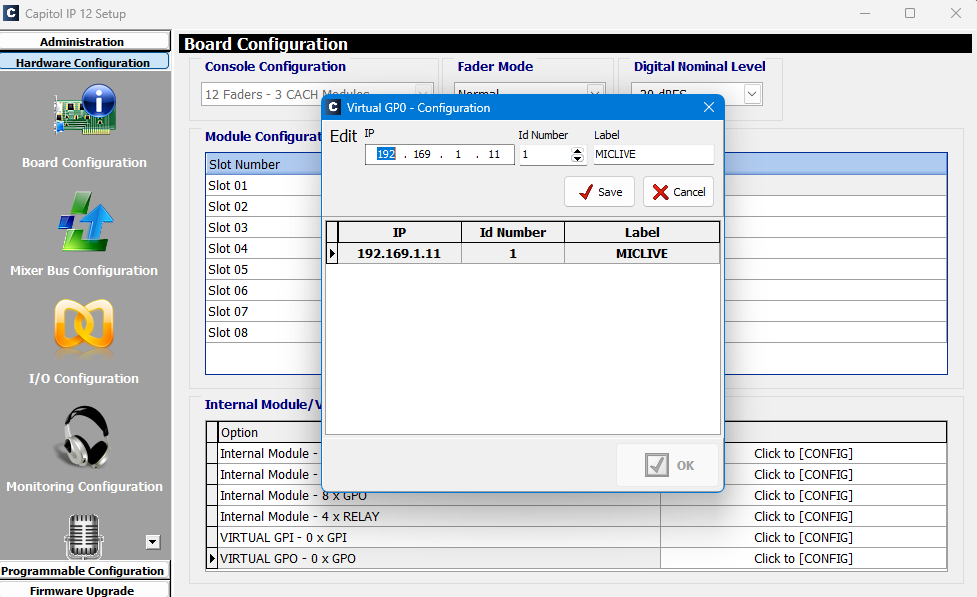
Now that you have a backup you can start by adding a Virtual GPO output connection to the IP address of the Hardware Service machine. This is done in the Hardware Configuration > Board Configuration section of the Setup Software. (See below)
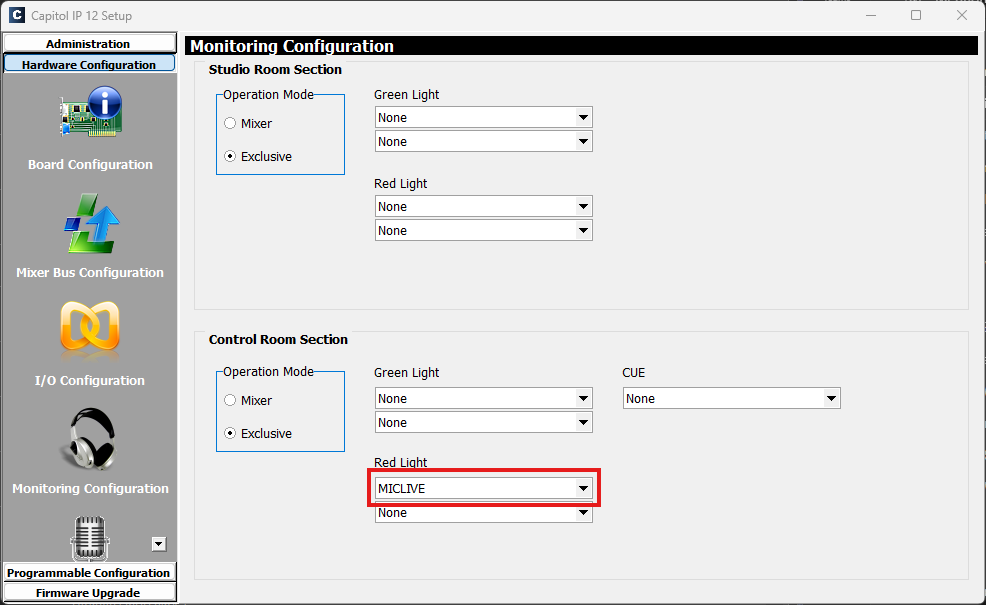
Then in the the Monitoring Configuration section you will need to set one or more of the Red Light dropdowns to trigger that GPO for either the Control or Studio side (depending on how you are using the desk) (See below)
Once that is done you should be able to see the line on the Hardware Service Monitor software ticking as the Mic goes on and off on the Forum. Now this can be patched to any other devices in the Hardware Service for use with SmartSign or Myriad Logging.
Was this article helpful?
That’s Great!
Thank you for your feedback
Sorry! We couldn't be helpful
Thank you for your feedback
Feedback sent
We appreciate your effort and will try to fix the article