Myriad Schedule Pro has built in support for many Playout/Automation systems, and most other systems will also be able to import Logs exported by using the various "Generic" export formats.
Some Playout Systems require additional configuration or there as special considerations required when working with these systems.
Minimum Supported Versions
Myriad Schedule Version: This export format was added in Myriad Schedule Pro v6.8.2
mAirList Version: This export format is based on the import format introduced in mAirList v5.0.3 and detailed in https://wiki.mairlist.com/reference:text_playlist_import_format_specification
mAirList Audio
For each Media Item in your Myriad Schedule database we recommend you enter the full Filename to the audio file including the path as this is used when Myriad writes the Log file.
Alternatively you can enter the mAirList External ID in the format "E:1234-56" or the mAirList Internal ID in the format I:54321.
If there is no filename entered then Myriad will fallback on using the Media External Reference or Media ID as configured in the Station Playlist Export Settings window.
mAirList Options
If you need to specify an Options item, create a Media Item and set the External Reference as O: followed by the options and these will be added to the Playlist file as an Options Line.
Adding an Export to an mAirList Playlist file
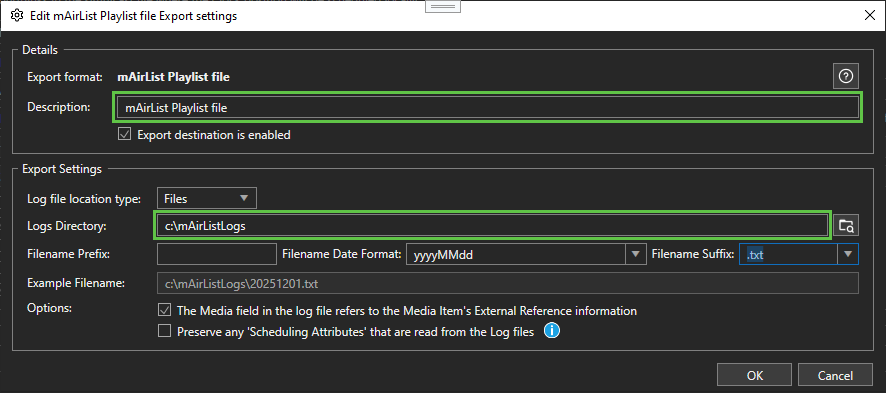
To add an export to PlayIt Live, in Myriad Schedule Pro, click on the Stations menu, then Station Settings, then select the Log Import/Export tab. In the "Log Export" section at the bottom, click the 'Add' button on the right hand side and select 'mAirList Playlist file'.
On the window that opens, enter a suitable Description and enter/select the Logs Directory that you want the files to be exported to:
mAirList Break Notes:
You can use Myriad Media Items set as "Commands" to send 'Dummy' items notes to the mAirList playlist file . Please see the mAirList documentation for more information about supported dummy and/or Options items.
Myriad Schedule Clock Item Types and their mAirList equivalents
| Myriad Clock Item Type | mAirList |
|---|---|
| Absolute Time | Hard Fixed Time |
| Soft Time | Soft Fixed Time |
Was this article helpful?
That’s Great!
Thank you for your feedback
Sorry! We couldn't be helpful
Thank you for your feedback
Feedback sent
We appreciate your effort and will try to fix the article